
Filming
How to Shoot Reels on Your Phone: Light, Sound and Framing
You don't need a camera, a ring light or a gimbal. You need a window, a shelf and a plan.
The short answer
Face a window, get the phone close to your mouth or use a cheap clip mic, film vertically at eye level, lean the phone on something so it doesn't shake, and lock focus and exposure. Then shoot three kinds of shot (a close-up for talking, a detail shot, and a wider shot) so you have something to cut between.
1. Light: face the window
Daylight from a window is the best free light you have. Stand or sit facing it, or with it slightly to one side so one half of your face is a little darker; that shadow is what makes a face look three-dimensional.
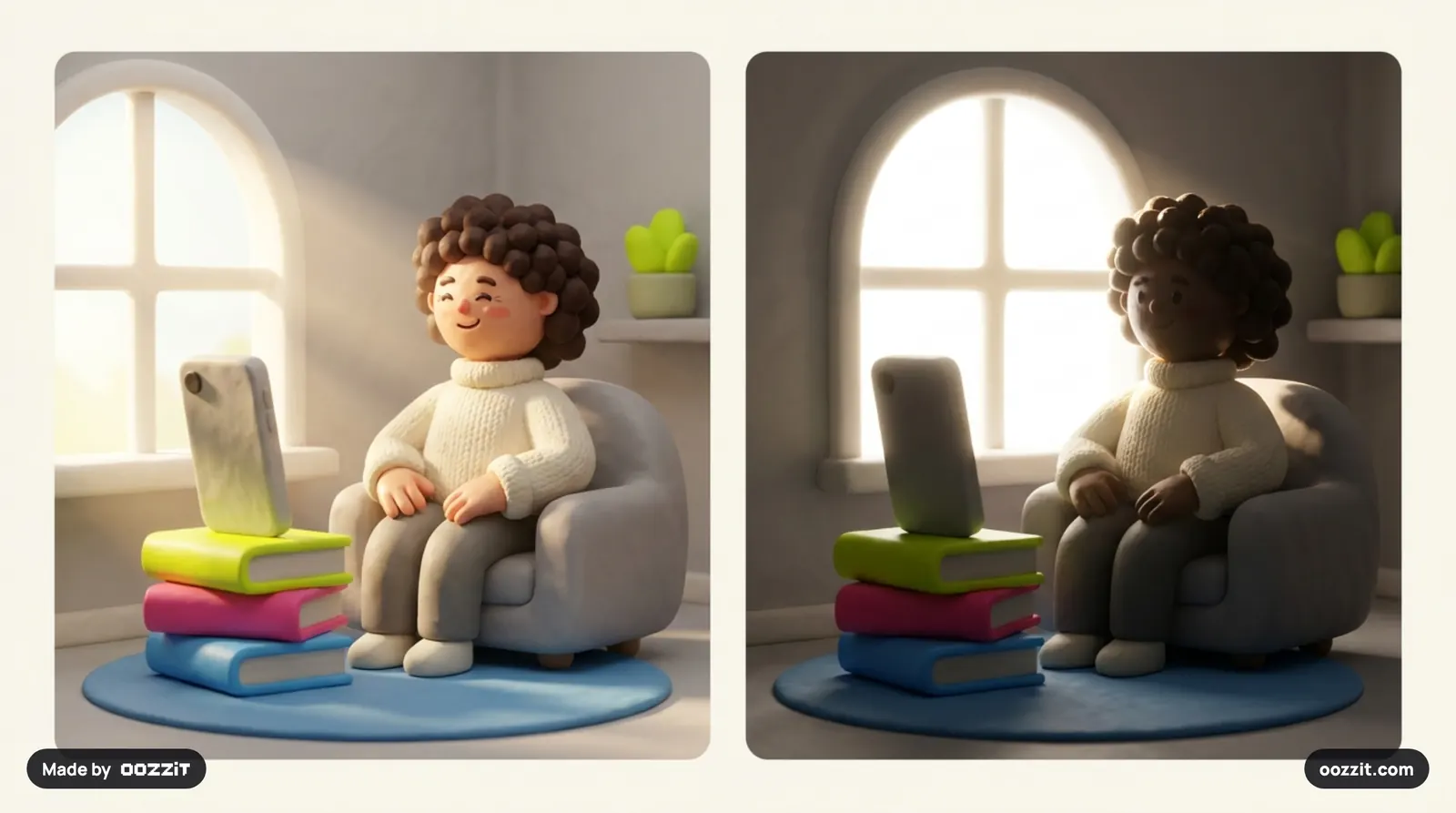
- Don't put the window behind you. The phone exposes for the bright window and you turn into a silhouette.
- Don't film under a single ceiling bulb at night. It throws shadows under your eyes. If you must film at night, put a lamp in front of you, a little to one side.
- Overcast days are great: soft, even light with no harsh shadows.
2. Sound: closer beats expensive
People forgive soft video but not bad audio. The cheapest fixes:
- Get the mic closer. A phone a metre away records the room. At arm's length it records you.
- Film in a room with soft things in it: curtains, a bed, a sofa. Bare walls and tiles echo.
- A clip-on mic is the best upgrade under ₹2,000, more useful than any light.
- Turn off fans and ACs that hum, and put your phone on Do Not Disturb.
3. Framing: shoot for the Reels screen
- Vertical, 9:16. Film upright so nothing gets cropped later.
- Phone at eye level. Lower looks up your nose, higher looks down on you. Stack books if you need to.
- Eyes about a third of the way down the frame, not in the middle.
- Leave room for Instagram's buttons. The like, comment and share icons sit on the right, and the caption covers the bottom. Keep your face and any on-screen text away from the bottom fifth and the right edge.
- Clean the lens. A thumbprint is the most common reason phone video looks hazy.
4. Steady the shot
Handheld footage shakes more than you notice while filming. Lean the phone on a shelf, a stack of books or a glass. A small tripod with a phone clamp costs a few hundred rupees and pays for itself on the first reel.
Before you press record, tap and hold on your face to lock focus and exposure (on iPhone you'll see "AE/AF Lock"; on most Android phones a similar tap locks it). Otherwise the brightness pumps every time you move.
5. A simple 3-shot plan
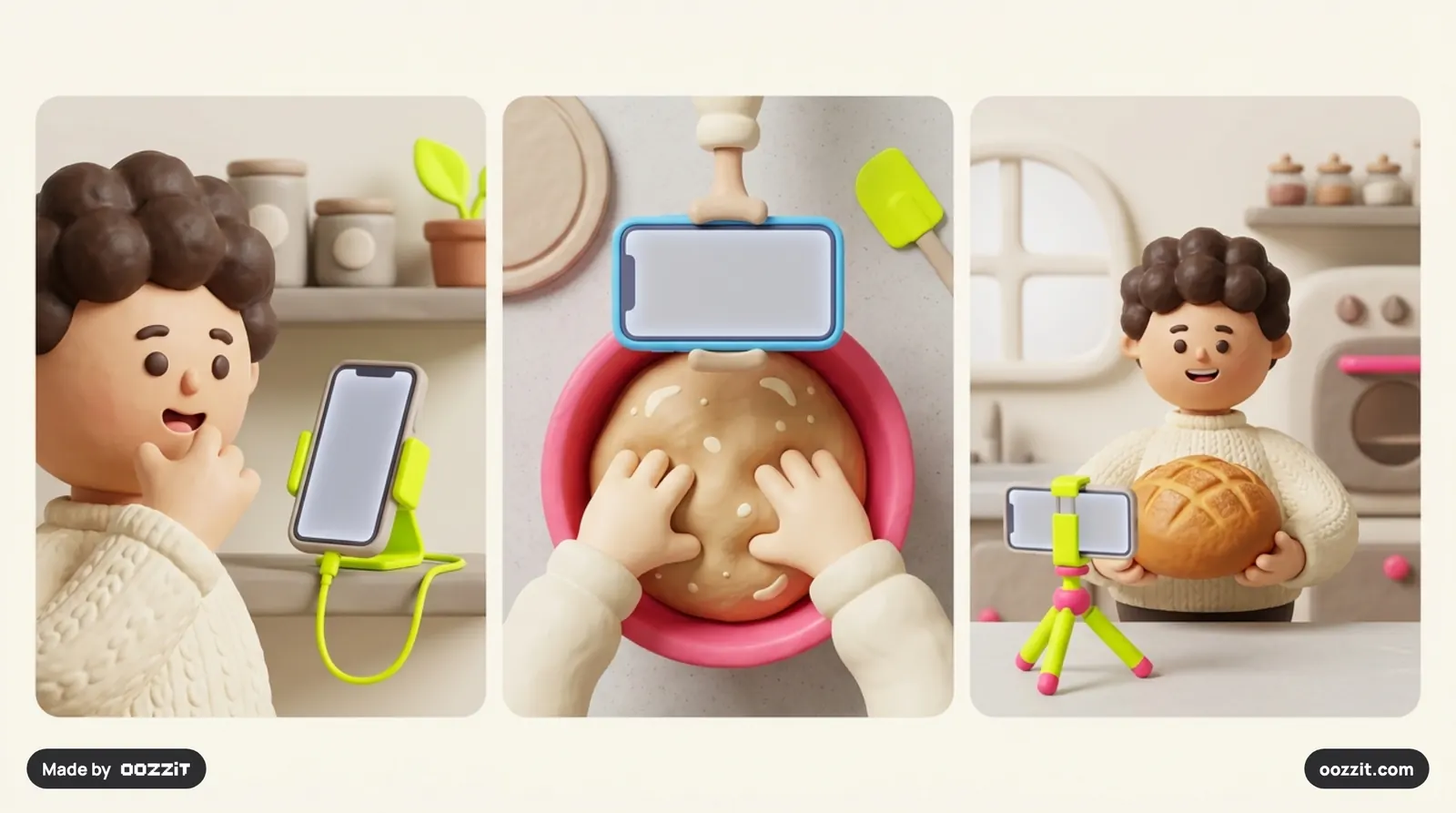
One long take is hard to watch. Three kinds of shot give you something to cut between, which keeps the reel moving. For a tip reel about sourdough, it looks like this:
| Shot | What it shows | How to film it |
|---|---|---|
| 1. Close-up | You saying the hook and the main lines | Chest up, eye level, window on one side, phone leaned on a shelf |
| 2. Detail / overhead | Your hands doing the thing: mixing, writing, typing | Phone flat above the table on a stack of books or a clamp, looking straight down |
| 3. Wider shot | The result, held up or shown off | Waist up, and slowly slide the phone toward you as you deliver the payoff |
Film each shot two or three times. It takes ten more minutes and saves the whole video when one take has a stumble in it.
What works, and what Instagram won't recommend
Instagram has published its own guidance on this. It's less likely to recommend Reels that are:
- Blurry or low-resolution. Film at 1080p or higher, and export at the same quality.
- Framed with borders, like a horizontal video sitting in the middle of a vertical frame.
- Mostly covered in text. On-screen text should support the video, not replace it.
- Carrying another app's logo or watermark. Export a clean copy before you upload.
| Works | Doesn't |
|---|---|
| Facing a window, light on your face | A window or lamp behind you |
| The mic close to you, in a room with soft furnishings | A phone across a tiled room |
| Phone at eye level, leaned on something steady | Handheld from below the chin |
| Vertical 9:16, 1080×1920, 30 fps or more | Horizontal clips with black bars |
| Three kinds of shot to cut between | One long, unmoving take |
| Text kept clear of the buttons and caption | Text hidden under the like button |
Camera settings worth checking once
- 1080p or 4K at 30 fps for talking. Use 60 fps if you want to slow down movement later.
- Use the main (1×) lens for faces. Ultra-wide lenses distort faces close up.
- Turn off beauty filters. Smoothed skin looks fake, and "this looks real" is part of why people trust a reel.
Mistakes that quietly ruin a take
- Looking at yourself on screen instead of the lens. Viewers feel the eye contact drop.
- Starting to talk the moment you press record. Wait one second; leave one at the end too.
- Filming everything in one spot. Even a two-step move between shots makes the edit feel alive.
- Forgetting the hook text. Plan where the 3–7 words of on-screen text will go before you frame the shot.
Need the words first? Start with our reel script template.
How GroReel helps
Get a shot list for your idea
The Script & Shoot Plan turns your idea into a script and a shot list you can film on your phone this afternoon.
- Shot-by-shot direction: what to film for each beat, the framing, and a phone tip for each shot.
- A cut list from your clips: drop raw footage and get the exact seconds to keep and the order to put them in.
- Then check it: film it, upload the draft, and get a score and fixes before you post.
Built on the same signals this guide covers. 1 free check · no card · your video is deleted after the check.
Questions people ask
How do I make my reels look professional on a phone?
Face a window for light, get the microphone close to you, film vertically at eye level, steady the phone on something, lock focus and exposure, and shoot a few different shots so the edit can cut between them.
What camera settings should I use for Instagram Reels?
Film vertically at 1080p or 4K, 30 frames per second for talking (60 if you plan to slow motion down), on the main 1× lens, with beauty filters off and focus and exposure locked on your face.
Where should I put text in an Instagram Reel?
In the top two-thirds of the frame and away from the right edge, where Instagram's like, comment and share buttons sit. The bottom of the screen is covered by the caption.
Sources
Read next
 ScriptsReel Script Template: The Format That Keeps Viewers WatchingMost reels lose people in the middle, not the start. A script fixes the middle.
 HooksInstagram Reel hooks: 30 opening lines that stop the scrollThe first line decides whether anyone sees the rest. Here are 30 that work, and how to tell a good one from a bad one.
 ReachWhy Are My Reels Not Getting Views? 9 Reasons and FixesYour reel isn't being rejected. It's being scrolled past. Here's how to find out which of nine things is doing it.